Penetration Testing - Uniscan ( Windows & Linux)
 Mücahit Topal
Well friends, I would like to give you at least a little information about one of the tools used for penetration tests. When you run the test with Uniscan, it will be to your benefit to go back over the results you find in the code of your sites and try to close these bugs / vulnerabilities.
You can use this tool on both operating systems, Windows and Linux...
- For Windows;
First of all, so that you can use the Perl language on Windows and so that we can run and test CGI/Perl applications, you need to download and install the program below.
Then let's download the tool we are going to use from below.
I will explain how to run it with two different methods; first, since I think of you as someone who builds sites on your computer, I am assuming that Apache Server is installed.
For the first one, copy the tool you downloaded into the localhost directory and browse to that directory,
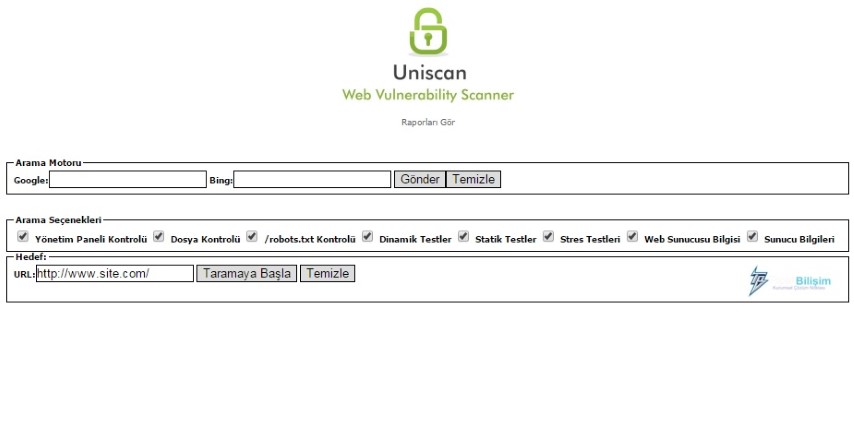
You will be greeted by a page like this,

there is really no need to explain much on this page, everything is plainly out in the open :)
For the second one, go into the folder of the tool you downloaded, Shift-Right Click and choose the Open command window here option. The familiar CMD screen will appear in front of us.
When we type uniscan.pl on this screen and then enter the parameters, our scan will start,
I will list the parameters below

This is how it looks at the moment the scan starts after we press Enter; I showed it with the parameters already entered

If you want to stop the scan while it is still running, pressing the CRTL-V key is enough.
- For Linux ;
On some Linux distributions, such as BackTrack and Kali, these tools and many more are waiting for us already installed and ready to use; when you want to install it separately
# apt-get install uniscan
# uniscan -h
using these commands is enough; you can look up the parts you get stuck on on the internet.
Again we need to install the Perl module, if it is not already installed of course
# apt-get install -y perl
or
# apt-get install libmoose-perl
As the easy way, I will again tell you to download the link below and, if php is up and running on your system, to copy the files into the directory and browse to that directory,
and as the second way, go to the folder where the tool is from a terminal window and let's start by typing perl uniscan.pl ; again the parameters need to be entered after it.
Sample screenshot

- Parameters
-u target site: https://www.hedefsite.com/
-f list of urls
-b Send Uniscan to the background
-q Admin Panel Check
-w File Check
-e /robots.txt Check
-d Dynamic Tests
-s Static Tests
-r Stress Tests
-i Bing Search
-o Google Search
-g Web Server Information
-j Server Information
Download --> Uniscan
Download --> Perl
Wishing You Use It in Good Days...
