Building a Password-Protected Form Login with C#
 Mücahit Topal
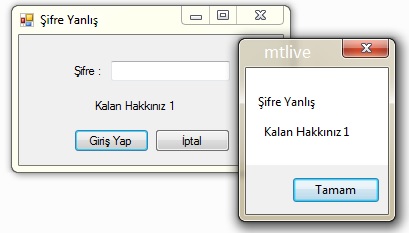
In this post we will build a simple password-protected form login example. Let's take a look at a nice and simple technique that you have considered using from time to time in your applications, in the programs you write or in the projects you are working on, or that you are only now starting to consider.
What we need for this application;
- For Form1;
- 2 Buttons
- 2 Labels
- 1 TextBox
- For Form2;
- Nothing At All (:
Form1.cs
using System;
using System.Collections.Generic;
using System.ComponentModel;
using System.Data;
using System.Drawing;
using System.Text;
using System.Windows.Forms;

namespace ŞifreliGirişYap
{
    public partial class Form1 : Form
    {
        public Form1()
        {
            InitializeComponent();
        }

        private void Form1_Load(object sender, EventArgs e)
        {
            //Make the Cancel button active when Esc is pressed
            this.CancelButton = button2;
            //Make the OK button active when Enter is pressed
            this.AcceptButton = button1;
        }


        int hak = 3; // We Define 3 Attempts
        private void button1_Click(object sender, EventArgs e)
        {
            hak--; // We subtract 1 each time the button is pressed
            if (textBox1.Text == "123456")
                this.DialogResult = DialogResult.OK; //If the Password Is Entered Correctly, It Opens Our Form
            else
            {
                textBox1.Text = "";
                this.Text = "Wrong Password";

                    if (hak == 0) // If All 3 Attempts Have Been Used
                    {
                        this.DialogResult = DialogResult.Cancel;
                        MessageBox.Show("You Have Used All Your Attempts, You Are Not Authorized to Open the Program");
                    }
                    else // We Count the Attempts and Write Them to the Screen
                    {
                        label2.Visible = true;
                        label2.Text = "Attempts Remaining " +hak ;
                        MessageBox.Show("Wrong Password \n \n  Attempts Remaining " + hak);
                    }
            }
        }

        private void button2_Click(object sender, EventArgs e)
        {
            this.DialogResult = DialogResult.Cancel; // The Form Closes When the Cancel Button Is Pressed.
        }

    }
}
Form2.cs
using System;
using System.Collections.Generic;
using System.ComponentModel;
using System.Data;
using System.Drawing;
using System.Text;
using System.Windows.Forms;

namespace ŞifreliGirişYap
{
    public partial class Form2 : Form
    {
        public Form2()
        {
            InitializeComponent();
        }

        private void Form2_Load(object sender, EventArgs e)
        {
            Form1 form = new Form1();
            form.Text = "Enter Password..";
            form.ShowDialog(); //Show the password form

            if (form.DialogResult == DialogResult.Cancel)//If the password was not guessed or cancel was pressed, exit the program
            {
                Close();
            }
            else // If the Password Was Entered Correctly
            {
                MessageBox.Show("Congratulations, You Got the Password Right");
            }
        }
    }
}
That is all of our code; I hope it is useful to you.
Good Luck and Happy Coding.

